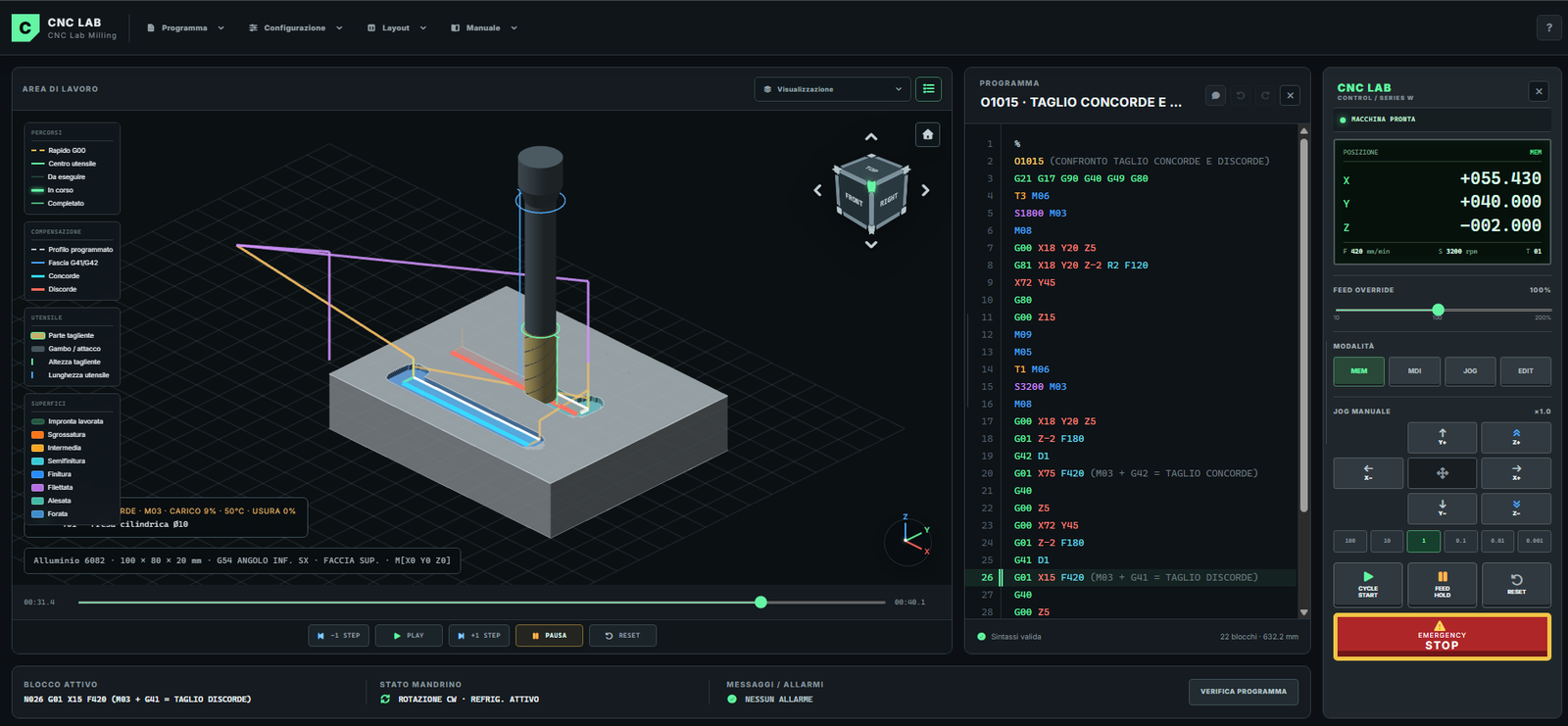
Reading a CNC program line by line is not always enough to understand its behaviour. We developed CNC Lab, a free browser-based laboratory that connects G-code to tool motion, remaining stock and machine state.
Try CNC Lab free ↗ Discover the project.
One workspace for program and simulation.
The interface combines a synchronised editor, 3D view, timeline, block stepping and machine panel. Each instruction remains connected to its visual result, making the toolpath easier to follow and problems easier to locate.
Milling, turning, laser and plotter.
CNC Lab provides environments for 3-axis milling and 2-axis turning, along with dedicated laser and plotter paths. A 2D and 3D CAD application in development complements the geometry workflow.
Assisted G-code editing.
Syntax colours, line numbers, contextual suggestions, quick reference cards and a synchronised active block help users read and correct programs. Protection stops explain the issue and link back to the responsible line.
Tools, work origins and setup.
A technical catalogue, T magazine, D radius offsets, G54–G59 work origins, material and stock settings configure the session. Programs, tools and preferences remain on the device, while the .cnclab format transfers a complete project.
Designed for training and preliminary checks.
CNC Lab is intended for practice, education and preliminary verification. It is not a certified verifier and does not replace validation on the real post-processor, controller and machine by qualified personnel.
Would you like to explore a CNC program before taking it to the machine?